
Expand Selection to Line Upwards
Expand selection to line. Upwards or downwards.
Details
Installs
- Total 443
- Win 292
- Mac 109
- Linux 42
| Oct 20 | Oct 19 | Oct 18 | Oct 17 | Oct 16 | Oct 15 | Oct 14 | Oct 13 | Oct 12 | Oct 11 | Oct 10 | Oct 9 | Oct 8 | Oct 7 | Oct 6 | Oct 5 | Oct 4 | Oct 3 | Oct 2 | Oct 1 | Sep 30 | Sep 29 | Sep 28 | Sep 27 | Sep 26 | Sep 25 | Sep 24 | Sep 23 | Sep 22 | Sep 21 | Sep 20 | Sep 19 | Sep 18 | Sep 17 | Sep 16 | Sep 15 | Sep 14 | Sep 13 | Sep 12 | Sep 11 | Sep 10 | Sep 9 | Sep 8 | Sep 7 | Sep 6 | |
|---|---|---|---|---|---|---|---|---|---|---|---|---|---|---|---|---|---|---|---|---|---|---|---|---|---|---|---|---|---|---|---|---|---|---|---|---|---|---|---|---|---|---|---|---|---|
| Windows | 0 | 0 | 3 | 0 | 0 | 0 | 0 | 0 | 0 | 0 | 0 | 0 | 0 | 0 | 0 | 2 | 0 | 0 | 0 | 0 | 1 | 3 | 0 | 0 | 0 | 0 | 3 | 0 | 0 | 0 | 0 | 0 | 0 | 0 | 0 | 0 | 0 | 0 | 0 | 0 | 0 | 0 | 0 | 0 | 1 |
| Mac | 0 | 0 | 0 | 0 | 0 | 0 | 0 | 0 | 0 | 0 | 0 | 0 | 0 | 0 | 0 | 0 | 0 | 0 | 0 | 0 | 0 | 0 | 0 | 0 | 0 | 0 | 1 | 0 | 0 | 0 | 0 | 0 | 0 | 0 | 0 | 0 | 0 | 0 | 0 | 0 | 0 | 0 | 0 | 0 | 0 |
| Linux | 0 | 0 | 0 | 0 | 0 | 0 | 0 | 0 | 0 | 0 | 0 | 0 | 0 | 0 | 0 | 0 | 0 | 0 | 0 | 0 | 0 | 0 | 0 | 0 | 0 | 0 | 0 | 0 | 0 | 0 | 0 | 0 | 0 | 0 | 0 | 0 | 0 | 0 | 0 | 0 | 0 | 1 | 0 | 0 | 0 |
Readme
- Source
- raw.githubusercontent.com
Expand Selection to Line Upwards
A Sublime Text plugin that expands selection to line upwards or downwards.
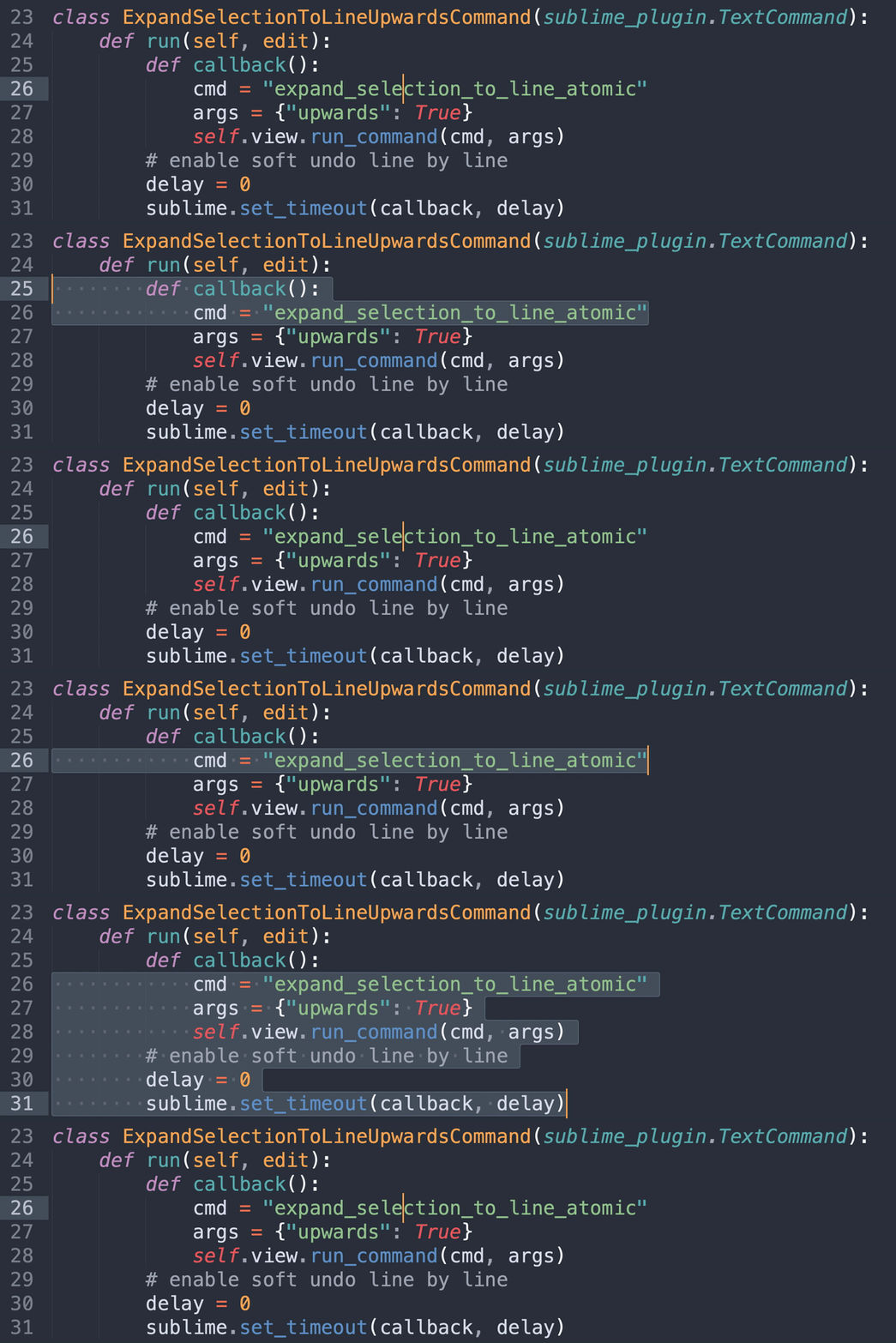
^ Upward and downward expansions, and their undos.
Install
How to Use
1. Key Bindings
No default key bindings. Define your own.
Recommended Key Bindings
{ "keys": ["primary+i"], "command": "expand_selection_to_line_upwards" },
{ "keys": ["primary+l"], "command": "expand_selection_to_line_downwards" },
{ "keys": ["primary+shift+l"], "command": "shrink_selection_by_line_upwards" },
{ "keys": ["primary+shift+i"], "command": "shrink_selection_by_line_downwards" },
| Command | Windows / Linux | macOS |
|---|---|---|
| Expand Selection to Line Upwards | Ctrl + I | Cmd + I |
| Expand Selection to Line Downwards | Ctrl + L | Cmd + L |
| Shrink Selection by Line Upwards | Ctrl + Shift + L | Cmd + Shift + L |
| Shrink Selection by Line Downwards | Ctrl + Shift + I | Cmd + Shift + I |
2. Main Menu
Selection > Expand Selection to Line Upwards
Selection > Expand Selection to Line Downwards
Selection > Shrink Selection by Line Upwards
Selection > Shrink Selection by Line Downwards
3. Command Palette
Expand Selection to Line Upwards
Expand Selection to Line Downwards
Shrink Selection by Line Upwards
Shrink Selection by Line Downwards
Author
Aaron Fu Lei
License
MIT